
Improved Transaction History and Member Purchase Information
The MemberGate transaction history has been updated to give members a clearer and more complete view of their account activity.
Previously, the transaction history primarily displayed membership billing transactions. Members could open an individual transaction to view a receipt, but the information available was fairly limited.
The updated Membership Account area brings membership transactions, shopping cart purchases, receipts, and bolt-ons together in a cleaner and more useful interface.
A Friendlier Membership Account View
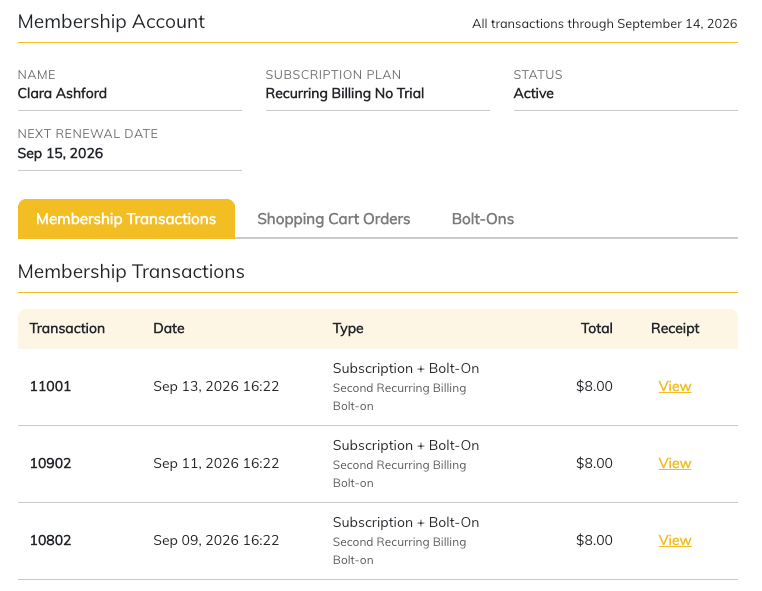
The redesigned page provides members with an at-a-glance view of important membership information, including their subscription plan, current status, and next renewal date.
Below the account information, transactions are organized into separate tabs for:
- Membership Transactions
- Shopping Cart Orders
- Bolt-Ons
This makes it much easier for members to find the information they are looking for without having to sort through unrelated activity.
More Detailed Membership Transactions
Membership billing history continues to display individual transactions, including the transaction date, type, amount, and a link to the receipt.
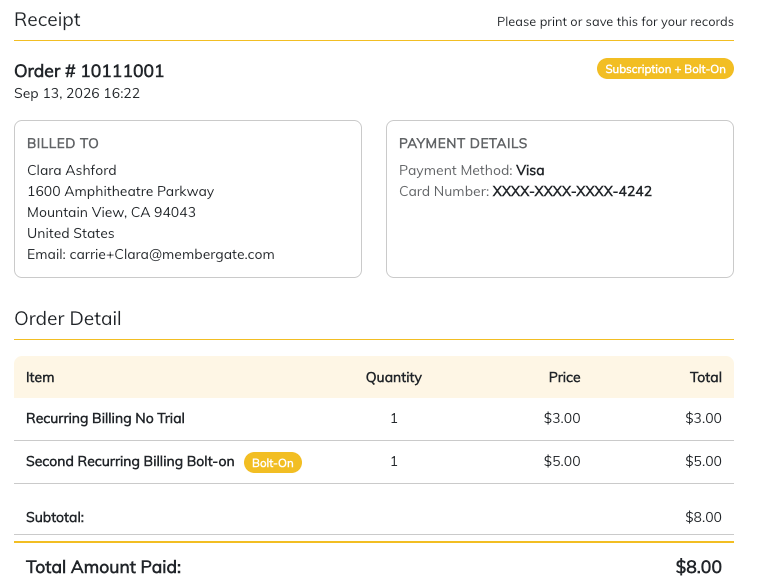
The updated receipts now provide more useful payment information. Members can see billing details, the payment method used for the transaction, individual items included in the charge, and the total amount paid.
When multiple items are billed together, such as a subscription and a recurring bolt-on, each item is clearly identified on the receipt.
This gives members a much better understanding of exactly what they were charged for and how the payment was made.
Shopping Cart Order History
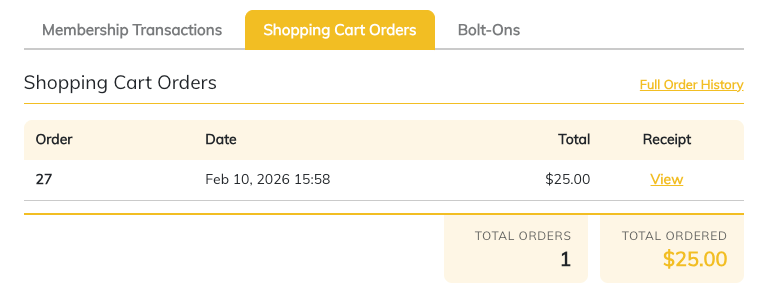
Shopping cart purchases now have their own dedicated area within the member account.
Members can quickly see recent orders, including the order date, total amount, and receipt. A full order history is also available for members who need to review earlier purchases.
Any download or access links associated with a shopping cart purchase will also be available with the order information, giving members a convenient place to return to purchased digital products or other content.
This helps reduce the need to search through old emails to locate purchase information or product access links.
Manage and Discover Bolt-Ons
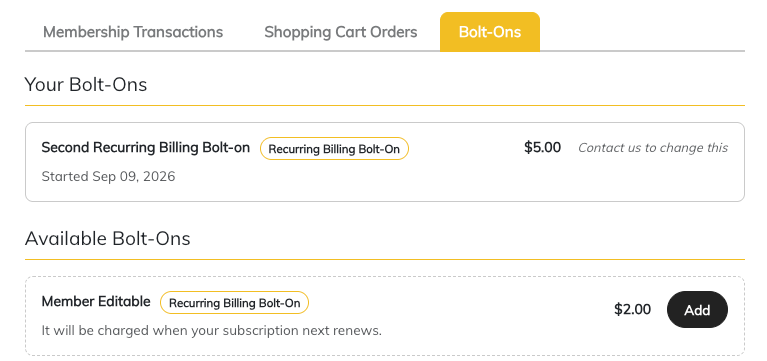
The new Bolt-Ons tab gives members a clear view of the additional products or services currently attached to their membership.
Existing bolt-ons are displayed along with relevant information such as the price and start date.
Sites that offer member-selectable bolt-ons can also display additional options that are available to add. Members can review those offerings and add an eligible bolt-on directly from their account.
For recurring bolt-ons, the page can also explain when the new charge will take effect, such as at the member's next subscription renewal.
Clearer, More Useful Receipts
Receipts have also received a visual and informational update.
The redesigned receipt provides an easier-to-read breakdown of the transaction, including:
- Billing information
- Payment method
- Order date and number
- Individual items purchased
- Item pricing and quantities
- Bolt-ons included with the transaction
- Total amount paid
Together, these details make receipts more useful both for members checking their own records and for site owners assisting with billing questions.
A More Complete Account History
The improved transaction history gives members one convenient place to understand their financial activity with the site.
Instead of seeing only a list of membership payments, members can now review subscription charges, shopping cart purchases, detailed receipts, active bolt-ons, available bolt-ons, and product access information from the same account area.
For site owners, this can also help reduce routine support questions by giving members better access to the information they need about previous purchases, billing, and account add-ons.
The result is a cleaner, more transparent account experience that makes it easier for members to understand what they purchased, what they are currently subscribed to, and what additional options are available to them.