
Tutorial
The Help Desk feature can be used as your contact page on your site.
This feature will help keep your customer support questions centralized and documented.

Any inquiries submitted to the Help Desk will send out a notification to your site's support.
Your staff can then view the various tickets based on which ones are new, open, completed or on hold.

Inquires can be made via a Help Desk Link that you set-up. The link will look similar to the one below:
https://www.yoursite.com/public/HelpDesk/
Click on each section to expand for more information
Your users/members will see the below screen when they visit your site's Help Desk. In the below example, we have filled out the support request with example information:
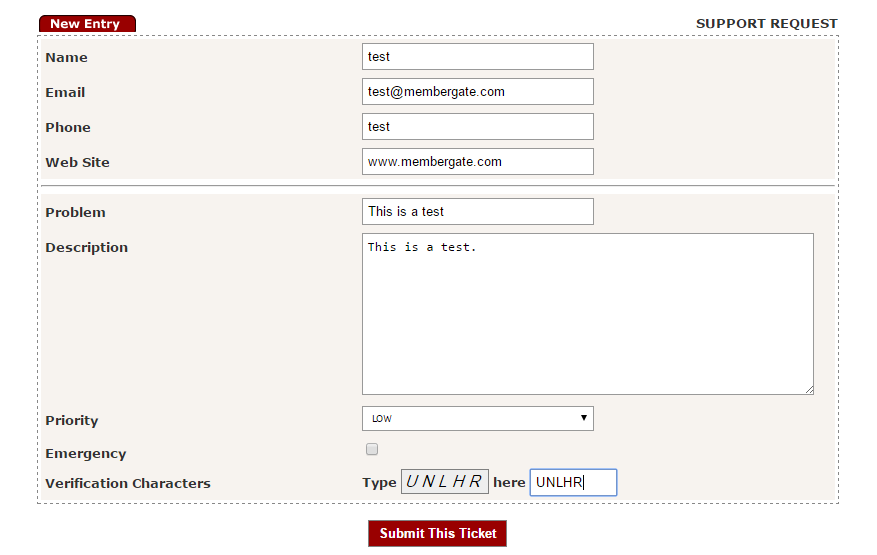
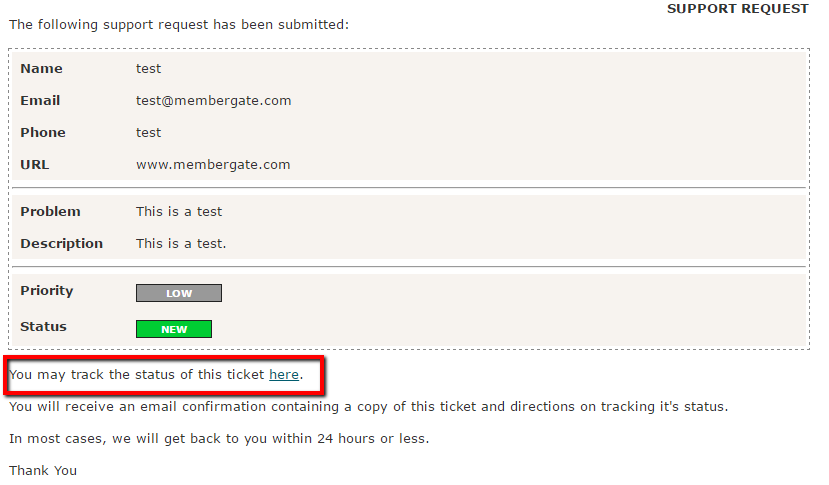
After your user/member has filled out the form, and clicked "Submit This Ticket" they will receive a confirmation response, seen below:
The user/member can track the ticket by clicking the tracking link, highlighted below:
The webmaster email address on your site is automatically set to receive ticket inquires.
To answer the ticket, log into your site, and go into the Control Panel.
The Help Desk ticket management can be found under Help Desk Job List
Within the "Help Desk Jobs List", the newest tickets will appear at the top (as you can see they are currently being Sorted By Date):
The report can be rearranged via any of the columns. Click on the or buttons to arrange the report as needed.

Click the ticket you wish to answer and enter in your responses under the Job section. Once you have entered your responses, click the button
The member will be emailed the response. The history of the responses can be seen by an admin when clicking back into that job.

The subject for the email message and the text that is added above the helpdesk form on the live site can be edited.
The Help Desk ticket management can be found under Help Desk Settings

A new ticket / job can be opened manually by a member of the site's support team.
Under Help Desk Add Job